
Orders, revenue, confirmation and delivery rates, and how your form converts — at a glance.
The Dashboard is the first page of the app. Use 7 days, 30 days or 90 days at the top to change the period.
The tiles
| Tile | What it shows |
|---|---|
| Orders | Orders created through your form in the period. |
| Revenue | Their total value, in your store’s currency. |
| Average order value | Revenue ÷ orders. |
| Confirmation rate | Orders confirmed (by you marking them, or by a delivery outcome) ÷ orders with an answer. |
| Delivery rate | Delivered ÷ orders with a delivery outcome. Shows “—” until outcomes exist. |
| Leads captured | Shoppers who typed a phone number and left without ordering. |

The charts
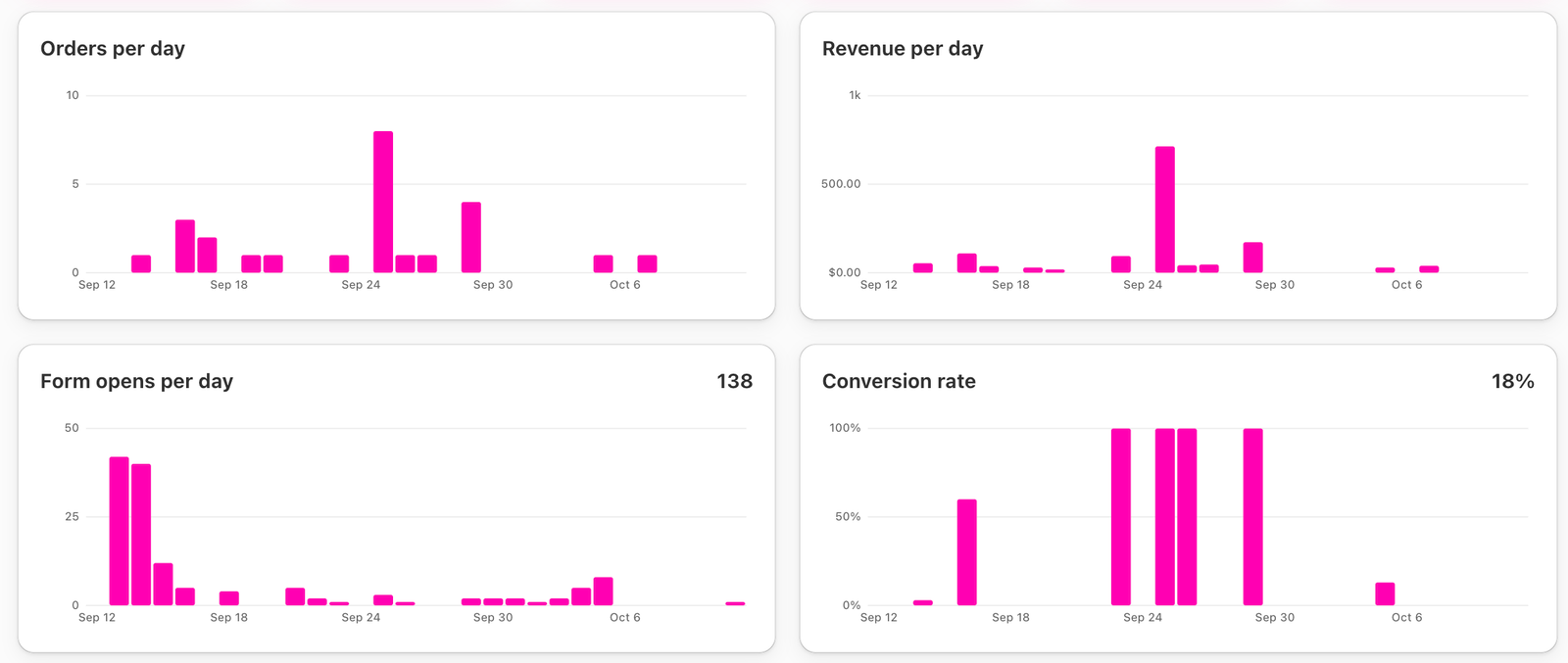
- Orders per day and Revenue per day.
- Form opens per day — how many people opened your form.
- Conversion rate — orders ÷ form opens.
Below the charts
- Profit costs and the Campaigns table — see Campaign profit and POAS.
- The orders list — see Manage your orders from the Dashboard.
- Shortcut cards to CODPrem Order Workflow, Abandoned Leads (with the number of new leads waiting for a call) and App language.
Banners you may see
- Your form is not live yet — the CODPrem app embed is off in your theme. Press Enable form.
- Order limit notices as you approach your plan’s monthly orders.
- Free trial notices.
- An order was charged more/less than the form showed — see Price mismatch notice.